Zoo Animal: A Designer's Guide to Using This Playful Dingbat Font Correctly
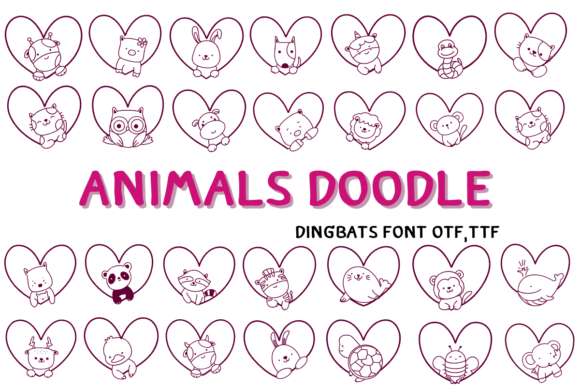
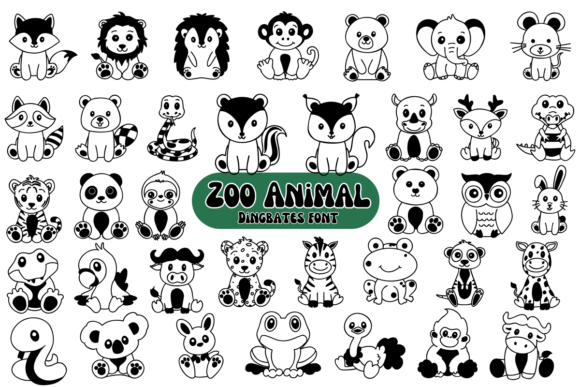
Finding the right visual element to inject personality and fun into a project can be a challenge. You need something that is both charming and functional, capable of capturing attention without overwhelming the core message. This is where the Zoo Animal font enters the picture. It’s not a traditional font with letters and numbers; instead, it’s a delightful dingbat font, a collection of symbols where each keystroke reveals a different creature you’d find at the zoo.
The appeal of Zoo Animal is immediate. It’s a fantastic resource for adding a playful, whimsical touch to a wide array of projects. Imagine creating vibrant invitations for a child’s birthday party, designing engaging educational posters for a classroom, or adding unique flair to a blog post about a family vacation. For marketers, it can be a clever way to add a friendly icon to a social media graphic. For small business owners, particularly those in childcare, pet services, or event planning, it offers a quick way to develop a recognizable visual identity. The font brings the excitement and diversity of the animal kingdom directly into your design toolkit, allowing your imagination to run wild.
Avoiding Common Pitfalls with Dingbat Fonts
However, the very thing that makes a dingbat font like Zoo Animal so appealing—its simplicity—can also lead to some common and frustrating mistakes. I’ve seen many creators, both beginners and professionals, stumble when they first incorporate symbol fonts into their workflow. These errors can result in a final product that looks unprofessional, is difficult to edit, or simply fails to communicate the intended message. Understanding these potential issues from the outset will save you time, prevent headaches, and ensure your projects look polished and effective.
The Invisible Character Problem
Perhaps the most frequent issue is what I call the "invisible character problem." You download Zoo Animal, install it, and type out a word like "LION" in your design software, expecting to see a lion symbol. Instead, you see nothing, or you see the standard letters L-I-O-N in a default font. This happens because Zoo Animal is not a standard alphabet. The symbols are mapped to specific keys, but not necessarily the ones you’d intuitively press.
This misunderstanding stems from thinking of it as a traditional font. The solution is to treat it like a character map. The creator of Zoo Animal has provided a guide, often a simple PDF or image file, that shows which animal corresponds to which key on your keyboard (a, b, c, 1, 2, 3, etc.). Before you begin any project, you must locate and review this guide. Trying to guess the mappings is inefficient and will only lead to frustration. Better yet, use the Glyphs panel in software like Adobe Illustrator, Photoshop, or Affinity Designer. This panel visually displays every symbol in the font, allowing you to simply click on the animal you want to insert it into your text box.
Scalability and Quality Concerns
A common oversight is assuming all fonts are created equal in terms of quality. While Zoo Animal is a high-quality font, it’s crucial to consider the end-use of your design. Will your zoo-themed invitation be viewed on a screen, or will it be printed on a large banner? If you plan to scale the symbols up significantly, you need to ensure the font file is vector-based, which most modern fonts are.
The mistake here is creating a design at a small size and then trying to enlarge it for a different application, only to find the edges become pixelated or blurry. A better approach is to always design at the largest size you anticipate needing. If you are creating a logo or a key graphic element using a Zoo Animal symbol, consider converting the text to outlines (or curves) in your vector software once you are happy with the design. This turns the symbol into a scalable shape rather than a live text character, guaranteeing it will remain crisp at any size. This is a professional practice that prevents quality loss and ensures your designs are versatile for both digital and print media.
Making Better Choices for a Cohesive Design
Using a playful font like Zoo Animal effectively means making smart design choices that complement its character. Simply dropping symbols into a document without thought can result in a chaotic or amateurish look. The goal is to use the font as a highlight, not as the main event that competes with your message.
Font Pairing is Everything
One of the biggest design missteps is pairing Zoo Animal with another decorative or overly complex font. The result is visual clutter, where nothing stands out and the text becomes difficult to read. The charm of the zoo animals is their clean, graphic nature. To let them shine, they need a calm and stable partner.
The best practice is to pair Zoo Animal with a simple, highly legible sans-serif or serif font for your body text and headlines. Think of fonts like Lato, Montserrat, Open Sans, or even a classic like Garamond. These fonts provide a neutral, readable foundation that allows the playful animal symbols to act as charming accents. For example, in a poster, you might use a bold sans-serif for the title "Zoo Adventure" and then use a Zoo Animal lion symbol as a decorative bullet point or a small icon next to the event details. This creates a balanced and professional hierarchy that guides the viewer's eye.
Overuse and Thematic Consistency
Another mistake is using the font too liberally. A flyer covered in dozens of different animals can feel more like a chaotic sticker sheet than a coherent design. The power of the Zoo Animal font lies in its ability to add a specific, targeted touch of fun. Ask yourself what the purpose of the symbol is. Is it to highlight a key piece of information? To add a decorative element to a corner? To replace a standard bullet point?
A more effective strategy is to select one or two animals that are most relevant to your project's theme and use them consistently. If you’re creating materials for a safari-themed party, stick to the lion, giraffe, and zebra. If it’s for a petting zoo, use the goat, sheep, and rabbit. This selective use makes the design feel intentional and curated. It also reinforces your message, rather than diluting it with unrelated imagery. This approach demonstrates a thoughtful design process, which builds trust with your audience, whether they are customers, students, or party guests.
Your Pre-Flight Checklist for Using Zoo Animal
Before you finalize any project using the Zoo Animal font, run through a quick mental checklist to ensure you’ve avoided the common pitfalls and are presenting your best work.
- Confirm the Symbol Map: Have you used the official character map or your software's Glyphs panel to select the correct animals? Don't guess.
- Check Your Font Pairing: Is your primary text font clean and easy to read? Does it support, rather than fight with, the playful nature of the Zoo Animal symbols?
- Assess the Balance: Have you used the animal symbols sparingly and intentionally? Does their placement add to the design's clarity and appeal, or does it create clutter?
- Evaluate the Scale: Is the size of the symbols appropriate for the final output? If it's for print, have you ensured the quality will hold up by working with vector graphics?
- Consider the Audience: Is the overall tone appropriate for your project? A whimsical animal font is perfect for a child’s party but might not be suitable for a serious corporate report.
By taking a moment to consider these points, you move from simply using a font to strategically implementing a design element. The Zoo Animal font is a wonderful tool that, when used with a bit of foresight and care, can elevate your creative projects, making them more engaging, memorable, and effective. It’s about harnessing the fun of the zoo in a way that is polished, professional, and perfectly suited to your vision.