The Spring Palette Revolution: Mastering Marvel Bloom for Modern Design
In the ever-evolving landscape of digital design and typography, the transition from monochrome text to fully chromatic expression represents a significant leap forward. At the forefront of this movement is the rise of full-color SVG fonts, a technology that transforms standard typing into an act of illustration. A prime example of this innovation is Marvel Bloom, a distinctive typeface that captures the essence of a spring color palette while utilizing a playful video-game aesthetic. Understanding how to implement, manage, and optimize such fonts is becoming a critical skill for graphic designers, crafters, and content creators alike.
Understanding the Architecture of Color Fonts
To fully appreciate the capabilities of Marvel Bloom, one must first understand the underlying technology that powers it. Unlike traditional vector fonts (such as standard .TTF or .OTF files) which rely on a single color—usually black or white, defined by the software interface—SVG fonts embed actual graphic data within the font file itself. The "SVG" stands for Scalable Vector Graphics. This means the font file contains detailed vector paths filled with specific colors, gradients, and textures.
When a user types a character using Marvel Bloom, they are not merely outlining a shape; they are stamping a pre-designed, full-color illustration onto the canvas. This technology allows for complex visual effects that were previously impossible to achieve through typography alone, such as gradients, texture overlays, and multi-colored fills within a single glyph. Because the data is vector-based, the text remains crisp and clear regardless of how much the user scales the design, ensuring professional results for both small web icons and large-scale print banners.
The Aesthetic Identity of Marvel Bloom
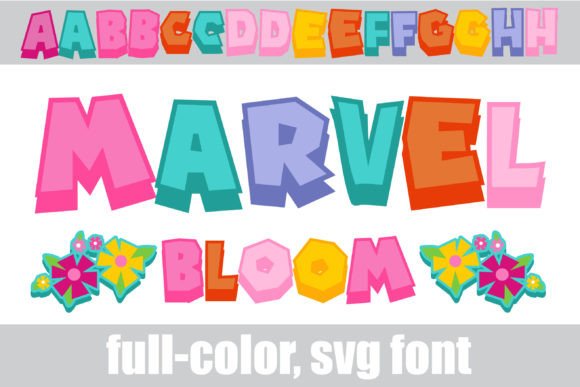
The visual identity of Marvel Bloom is defined by its unique fusion of retro gaming nostalgia and organic floral themes. The font structure mimics the pixelated or stylized lettering often found in classic role-playing games or adventure titles, providing a sense of familiarity and fun. However, it elevates this style by applying a vibrant spring color palette. The glyphs are rendered in soft pastels, bright greens, and blooming floral tones, moving away from the harsh neon often associated with gaming typography.
This specific design choice makes Marvel Bloom exceptionally versatile for seasonal projects. It naturally evokes feelings of growth, renewal, and energy. The "blooming" aspect is not just a name but a literal description of the font's design elements, where letters often appear to be intertwined with or composed of floral motifs. This makes it an ideal candidate for projects that require a touch of whimsy without sacrificing legibility.
Unlocking Advanced Features: Alt Cases and Glyph Maps
One of the most powerful aspects of modern fonts like Marvel Bloom is the inclusion of OpenType features, specifically alternate character sets. While the default character set displays the standard spring palette, the designers have included an alternate case with additional color variations. Accessing these hidden treasures requires navigating the glyph map of your design software.
For users working within platforms like Silhouette Studio, the glyph map (or character map) becomes an essential tool. By opening this panel, users can view every available symbol within the Marvel Bloom font file. Here, you will find the alt cases that offer different color arrangements, allowing you to customize the text to match specific brand guidelines or project themes. This feature ensures that your designs remain dynamic; you are not locked into a single color scheme and can adapt the typography to various backgrounds or complementary elements.
Accessing Floral Accents
Beyond the alphanumeric characters, Marvel Bloom includes decorative floral accents that can be used to embellish your text. These are not standard punctuation marks but special glyphs triggered by specific keystrokes. To access these flourishes, users must utilize the "greater than" (>) and "less than" (<) keys on their keyboard.
When these symbols are typed while the font is active, they render as delicate floral vines or blooming accents. This allows designers to create custom borders, underline text with botanical motifs, or separate words with organic dividers. This level of integration bridges the gap between typography and illustration, allowing for a cohesive design language where the text and the decorative elements share the same style and color consistency.
Installation and Compatibility: A Technical Guide
Despite the complex data contained within the file, installing a full-color SVG font like Marvel Bloom is identical to installing any standard font. However, the rendering of these fonts depends heavily on the operating system and the specific software being used.
Installation Procedures
- Mac Users: The standard method involves double-clicking the .OTF file and selecting "Install Font" within the FontBook application. The operating system handles the rest, making the font available system-wide.
- Windows Users: Installation is typically done via the Control Panel under the "Fonts" section, or by right-clicking the font file and selecting "Install for all users." Alternatively, modern versions of Windows allow for dragging and dropping files into the Settings > Personalization > Fonts menu.
Once installed, the font is technically available to all programs. However, the visual experience will vary drastically depending on the application's support for the SVG OpenType format.
Software Support and The "Black Text" Phenomenon
A common point of confusion for users new to color fonts is the phenomenon of the text appearing solid black. This occurs because not all design software is equipped to interpret the embedded SVG data. If a program does not support full-color SVG rendering, it will fall back to rendering the font as a standard vector outline, ignoring the color fills and displaying the text in the default foreground color (usually black).
Marvel Bloom will show its true, vibrant colors only in compatible environments. Currently, the industry standard for color font support includes:
- Adobe Suite: Photoshop, Illustrator, and InDesign have robust support for SVG fonts, allowing for full editing and color manipulation.
- Silhouette Studio: Particularly the Business Edition, this software is popular among crafters and supports the rendering of color fonts for use with cutting machines.
- QuarkXPress: A staple in desktop publishing that offers comprehensive color font capabilities.
- Inkscape: As a free, open-source vector graphics editor, Inkscape supports SVG rendering, making it an accessible option for hobbyists.
The Preview Window Discrepancy
Even in programs that fully support color fonts, users may notice that the font appears black in the font selection preview window or dropdown menu. This is a standard limitation of many user interfaces, which generate previews using simplified rendering engines that do not support SVG data. Users should not be alarmed by this; the true test of compatibility occurs when the text is actually typed onto the document canvas. If the letters appear in the spring palette colors upon typing, the software supports the font correctly.
Practical Applications and Use Cases
The utility of a font like Marvel Bloom extends across various industries and creative hobbies. Its unique aesthetic makes it particularly suited for specific types of projects where standard typography might feel too sterile or corporate.
Crafting and Scrapbooking
For the hobbyist and professional crafter, Marvel Bloom offers a way to create intricate die-cuts and stickers. Because the font contains color data, users can print-and-cut the text without needing to manually color the letters in the design software. This streamlines the workflow for creating greeting cards, party invitations, and scrapbook embellishments, ensuring that the colors are perfectly consistent every time.
Digital Marketing and Social Media
In the fast-paced world of social media, grabbing attention is paramount. The video-game style of Marvel Bloom appeals to younger demographics and nostalgia-driven audiences. It is effective for creating eye-catching headers for YouTube thumbnails, Instagram stories, or Twitch overlays. The spring palette conveys a sense of positivity and approachability, making it suitable for lifestyle blogs, wellness brands, or educational content aimed at children.
Branding and Logo Design
While not suited for corporate law firms, Marvel Bloom is an excellent choice for niche branding. Bakeries, florists, toy stores, or indie video game developers could utilize this font to establish a playful brand identity. The vector nature of the SVG ensures that the logo can be scaled for use on business cards, websites, and storefront signage without pixelation.
Design Considerations and Best Practices
When working with Marvel Bloom, there are several design principles to keep in mind to maximize its impact. Because the font is visually dense and colorful, it functions best as a display or headline font. Using it for long blocks of body text can be visually fatiguing for the reader and may reduce readability.
Contrast is another critical factor. When placing Marvel Bloom over an image or a colored background, ensure there is enough separation so the text remains legible. Since the font contains its own internal colors (pinks, greens, blues), placing it on a background that clashes with these spring tones can create visual discord. Neutral backgrounds—such as white, cream, light gray, or even dark charcoal—often make the colors of the font pop most effectively.
Scaling and Resolution
Because SVG fonts are vector-based, they can be scaled to enormous sizes for banners or signage without losing quality. However, users should be aware of the complexity of the design. At very small sizes, the intricate floral details and the "video game" pixel edges might merge and become unreadable. It is advisable to test the font at the intended output size before finalizing a design. For small text applications, a simpler sans-serif font is usually a better pairing.
The Future of Typography
The introduction of fonts like Marvel Bloom signals a broader trend in digital typography: the convergence of text and art. As software support becomes more ubiquitous and file optimization improves, we can expect to see more designers moving away from static, monochrome text. The ability to install a single file that contains a rich palette of colors and styles simplifies the creative process, allowing for more expressive and personalized communication.
For the modern creator, mastering the installation and application of full-color SVG fonts is no longer a niche skill but a valuable asset. Whether you are a professional graphic designer looking to add flair to a client project, or a hobbyist creating custom party decorations, understanding how to leverage the capabilities of Marvel Bloom opens up a new dimension of creative possibility. By navigating the glyph maps, utilizing the floral accents, and ensuring the correct software environment, you can transform ordinary text into a vibrant celebration of color and style.